Blog
How I Hosted a Local Community Based CTF
March 26, 2019

Problem in the Spo
Over the previous summer I wondered 'how do I break into Infosec?' So many people struggle to find their way into the industry. When I thought about my path into the Infosec field, it felt like an insane amount of reading on r/netsec, watching LiveOverflow videos and reading book after book. But is there an easier way? After some more contemplation I realized at my small school in Spokane Washington that people did not even know security was a viable career path. In fact, most people had no idea what the industry itself even entails! To make it even worse, the security groups in Spokane were mostly just a talk or two from groups such as the Security Coalition of Spokane or DEFCON 509. Even though these discussions and talks were really helpful, there were zero hands-on hacking events in the Spo.
So, now we have a small group of people interested in security in the Spo with no hands-on events, no awareness at the schools in the area and no one to guide people down the right path... This is not the best situation! This is a story of how I decided to take action to give people the ability to learn about the security industry and what about it actually entails in a local community.
Beginning
With the problem at hand, it was time to take on the world! I thought seminars at the school, talks from professionals and some more course work might be viable options... I also organize a club called GUMAD (Gonzaga University Makers and Developers) which deals with getting professionals into the classroom to speak. However, students tend to be meek about things they are unfamiliar with. Also, the school is understaffed in the computer security area. So, my next question was how do we enlighten students about the fact that security is an important and is a viable field without scaring them away? With this in mind, the idea of running a capture the flag competition was born! :)
At this point, it values to understand my position of power (which is very litte). I am a senior computer science student from Gonzaga University (Spokane, WA for those of you who don't follow college basketball) who has jumped into the very large lake of security in the last two years. In my free time, I break stuff, play dodgeball or participate in CTF's. This upcoming summer (2019) I will be interning at Security Innovation (SI), which is a Security consulting firm that has most of its consultants in Seattle. Although I am not a veteran security professional at the moment, I am certainly on my way.
Now, back to the story... we have an idea about a capture the flag contest but how do we get people interested in this? The security buffs will be all over it. But, let's try to reach out to the people not in the field yet, instead of making the fat cows even fatter. This is where all of the magic happens:)
Excitement
At this stage, myself and a few people knew this was a brilliant idea: but, the success of the event is equivalent to zero if no one comes to it. Time to get people hyped for it!
Low Risk
People are afraid to take risks, inherently. Because of this, let's make this a very, very low risk event for everyone! Instead of having people pay to get into the event, let's make it free. That's right, no entry fee! Beyond just having no entry fee, people like to have food given to them during events. So, let's try to find some funding for food for everyone. The final piece of openness and inclusivity lies in how this was advertised; a learning event. Instead of trying to attract the winners of the next DEFCON CTF let's encourage people to come learn, even with no hacking or CTF experience. This openness creates a sense of acceptance that yes, I am smart enough to attend this event. I believe this was the key to the popularity of the event.
Coaches
Continue Reading →
Paperclip to a House: Turning Useless Data into an Authenticated User
February 21, 2019
Recently, I have been job hunting! I am a senior at Gonzaga University (graduating in May of 2019) looking to dive into the cybersecurity space. One morning, I strapped myself into my car, turned on Darknet Diaries and headed off! Sadly, the icy morning got the best of me. I got in a car accident 20 minutes away from the building I was meeting the company at... I missed the interview, and a major opportunity. I just wanted to put this whole situation behind me... Alas, I had to pay a traffic ticket for getting in a car accident; the worst hackers are angry hackers! This is where the story of the information disclosure issue begins:
In the Garage Sale episode of the Office, Dwight trades a thumbtack for a used candle, then the candle for collection of books then... Until, he claims to have the best item at the entire garage sale. This is in reference to the one red paperclip story where a man started with a paperclip, then ended up with a house. Although, a single paperclip is not a lot, he initially traded it for fish-shaped pen, then for a doorknob...Until, the house. The trick is, each individual trade solves a need for the buyer, but also gains value for the seller. In terms of information, a small and insignificant piece of information can lead someone to a slightly more trusted space. Then, this can get deeper, and deeper and deeper... Until, we have logged in as a person. In terms of the paperclip analogy, we have traded for the house.
Setting the Stage
The website to pay for the ticket had three different options for searching for a ticket: name and date of birth, ticket number and vehicle number (only for parking violations).
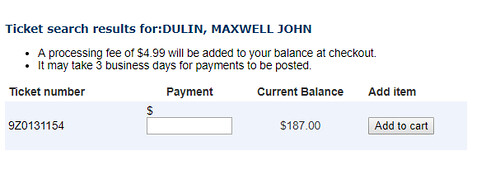
The name and DOB search option would bring me to a page to search using my first name, last name and DOB. If a valid result was found, it would redirect me to a page with the search results on it. On this page, the user was given an option to pay, that also displayed the ticket number. Furthermore, the tickets were incremental based upon the city.
The ticket search functionality was quite simple; just search for the ticket number! If the ticket number inserted is valid, then a similar looking page as Figure 2 would appear. The only difference between the two pages was the value being searched on.
Subtle Bug
The web application did a great job at validating that the DOB and name matched on this search option. However, once the validation was done on this page, it redirected to a new page with the ticket number for the user. The URL looked like this: https://some_website.gov/paymentonline/SearchResult.aspx?dataInd=NameDOB&inName=DULIN,%20MAXWELL&inDOB=1996-07-11. On this new page, the next step in the process only assumes the validated data from the previous step. However, this data is very clearly alterable. A malicious user has now bypassed the validation process.
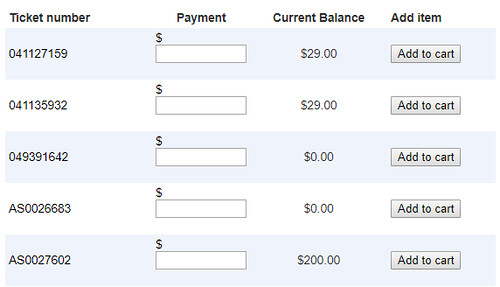
This validation mishap ended up being the downfall of this application. From there, a user could input arbitrary information into these two queries, without suffering at the constraints of validation. After some fiddling, I realized that the DOB was not even necessary! It was possible to just search based upon a name. However, even this wasn't the end... The name parameter was being sent into a like query with a wildcard ('%' for a like query). A query, such as https://some_website.gov/paymentonline/SearchResult.aspx?dataInd=NameDOB&inName=D would return all tickets with the recipient starting with the letter D. At the end, I realized that using a single '%' as the input parameter for inName would return all tickets that had ever been issued to a person or corporation. The output for all of the tickets can be seen in Figure 3.
Paperclip to House
Ticket Number to Name
Armed with just a paperclip, where do we start? In this case, we are armed with only ticket numbers to gather more information about our law breakers. Can we gather any more information from a ticket number? As stated before, there was a second option for searching: based upon a ticket number. From this search option, the search displayed a ticket number, as well as a first and last name of the recipient of the ticket. A ticket number, which feels like a relatively unimportant value, had just turned into a way to find a ticket associated with a person.
Name To Login
Now, we have traded a ticket number for the names of the individuals with the ticket. After looking through this website, I realized that the information gathered could take me no further. So, I started scouring the internet for other places to use this data. Until, I came across the counties court site with a login page (as seen in Figure 4).
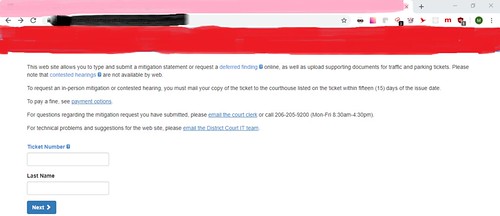
All this page wanted to login was a ticket number and last name! Bingo! With both of these pieces of information already known, we could now login as any user that had received a ticket.
Login to All The Information
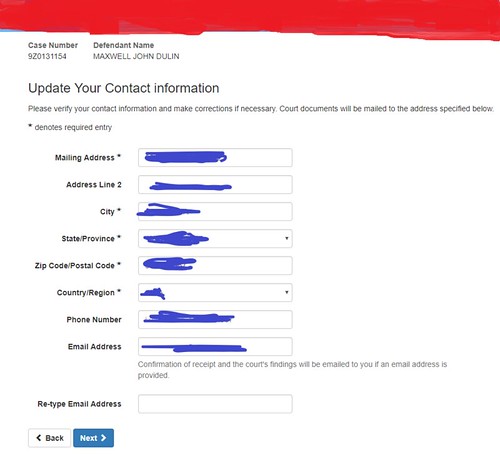
Within the authenticated user portal was a page with 3 options: Pay the fine (which just redirects back the previous site), request a mitigation hearing or request a deferred hearing. While playing around with the last two options, a very hefty amount of information suddenly appears (as seen in Figure 5).
This page has a mailing address, city, state, zip code, phone number and email addresses! The best part is that all of this information was autofilled into the form based upon previous knowledge payment portal on the previously visited website.
Is this all the information that can found on a person? Well, it is as far as I went. But, there was a possibility to go deeper with it. By going through the court mitigation requests it was possible to get the court to send an email with "Confirmation of the receipt and the court’s findings will be emailed to you if an email address is provided". Although, I did not follow through with this step, there is a very high chance that a full report about the incident would have been sent. This could have included a driver's license number or a license plate number, among other things.
From a slight information disclosure issue of a seemingly useless piece of data, it is quite amazing the amount of additional information that can be discovered. From a red paperclip to a house, or from a ticket number to an authenticated user.
Malicious Fun
Besides the information disclosure, while logged in as a person it was possible to sign up for a mitigation hearing or a deffered hearing without the person knowing! This could ruin someone with the law (for skipping a court date) or really get back at the justice system to have plenty of no-shows for the hearings. Both of these options could be catastrophic to either the person who requested the court date or the county court system.
Mitigations
Finding bugs is by far the most fun about these writeups. However, being able to fix them is more important to the client. So, when I sent this report in, I attached a few potential options for patching the issue:
- Client side data cannot be trusted. Either validate the data in all areas where the client can supply it or save the information in a server side object.
- Do not assume users go through steps in the correct order. Ensure this!
- Validate the input data coming in. I would consider this an SQLi because the query itself was manipulated.
- Have a better authentication system than just a ticket number and last name for such critical actions. A better mechanism would be an email address, ticket number and another private piece of information. Or, even better, have an automated phone bot that asks personal questions that only you could answer. Although, this is slightly inconvenient for a user.
Report
Initially, I was really scared to actually report the vulnerability that I had found; I remember reading stories of people going to jail for trying to help a companies security posture. However, I realized if I reported this in a nice and friendly manner, while conveying I was trying to help them (not myself) then they were going to be much more accepting of the issue. In the end, the people I talked to were very receptive about fixing the issue (also, I'm not in jail!)
Report process:
- 1/20/2019: Initial email with a report of the vulnerability sent to multiple employees.
- 1/21/2019: Chief Information and Privacy Officer contacts me.
- 1/28/2019: The searching capabilities are patched.
- 2/14/2019: Review is complete. The CISO claims that no private data had been stolen and a promise to improve the security posture, as well as promising that further testing will be done. This came with a notice that I may post about it, without including the county information.
Conclusion
In terms of security I learned a few things: do not trust any client side data coming in, users do not always do actions in the correct/expected order and a paperclip can turn into a house quite quickly. If you thought this article was fun or learnful, feel free to check out the rest of my website's content. Feel free to contact me with the email in the footer with any questions, comments or concerns. Cheers, Maxwell Dulin (ꓘ).
A Hypothetical Case of a Phishing Attack
November 23, 2018
Let’s say hypothetically that we receive an email from an old university email that looks like this:
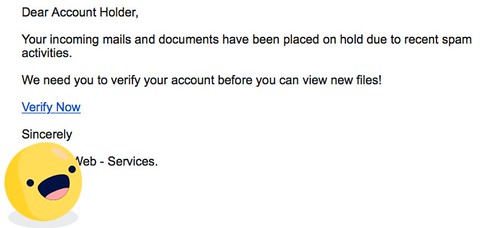
How would an average student view this?
Looks 👌legit.👌
Now what though? Maybe this email just came from someone who graduated 5 years ago and really likes to use their birthday as their password. Or, the email could have been spoofed?
Something has to be done about this hacker... How about we invite Evan Conrad of Segment to join in on the fun?
Let’s say, purely for story-purposes, that we clicked on this “verify now” business to see what all the fuss was about.
Continue Reading →
Digital Signatures, HMACs and Hashing
November 8, 2018
Background
There are a few key terms that should be known before reading this article. I will briefly explain these.Symmetric vs Asymmetric Encryption


Symmetric encryption takes a value, known as m and encrypts it with the key, K . To decrypt it, use K to go back to the original value. A basic example of a symmetric encryption cipher would be the Cesar Cipher.
Asymmetric encryption (otherwise known as Public Key Cryptography) has two different keys: a public key and private key. In order to encrypt the data, use the public key. To decrypt it, use the private key. An example of this is the RSA algorithm.
Both symmetric and asymmetric serve their role and have their issues. In the early days of cryptography, their common problem: how to share the key? This plagued people for generations! The key cannot go alongside the message...The key also cannot be sent in a different letter, as it can still be intercepted and read...This is where public key cryptography comes into play. Because the public key is known and available, then encrypt the data with the public (known) key. If the a malicious adversary tries to intercept the message it will not matter, as only the receiver will have the private key to decrypt the message. The key exchange issue was solved with the creation of public key cryptography.
Even though public key cryptography solved the key exchange problem, symmetric ciphers are still used today. Most asymmetric encryption algorithms are extremely expensive to compute. In the example of RSA, the encryption scheme looks like messagee (mod n). The issue comes with the messagee, where e is an extremely large value. So, encrypting all data using Public Key Cryptography is not a viable option. Because of this, symmetric key ciphers are still used to encrypt message information. Practically speaking, asymmetric encryption is used in order to exchange keys, while symmetric algorithms use the transferred key in order to encrypt the data. Now, that receiver knows the key, there is a very small chance for an adversary to be able to read the message.
Public Key Infrastructure (PKI)
The system that provides the Public Key Encryption keys and digital signatures for an entity is the PKI. The purpose of the PKI is to maintain and manage the keys/certificates that are in the system. By doing this, a trustworthy networking environment is created for using the cryptographic systems. To sum it up, the PKI ensures that the entity saying they own the public key, to encrypt the data to send to the other party, is actually the entity they claim they are. The most well known of this is implemented within the browser ecosystem, known as TLS (Transport Layer Security).
Hashing, HMAC and Digital Signatures
In order to have a consistent way to discuss the differences between the three methods, I will use the example of transferring a file throughout the post.
Hashing
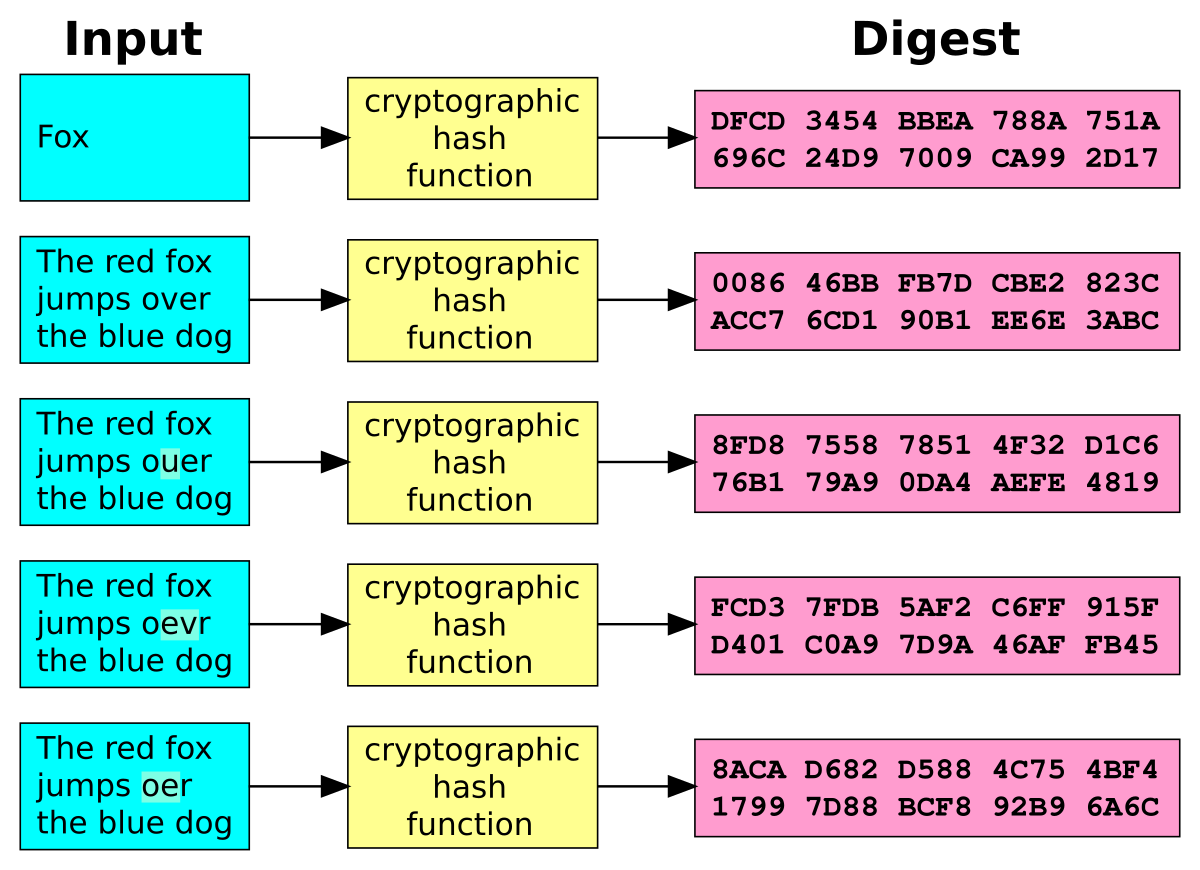
In general, hashing is a way to map an arbitrary sized data value to a fixed size (as shown in the image). In terms of security, a hash function allows someone to easily verify that two values are the same, without actually knowing the value itself. Typically, cryptographic hash functions are known as 'one-way' functions. This means that a value is easy to hash, but near impossible to go from the hash to the original value. Another interesting property of hash functions can be seen in the picture. If a single bit is changed, then it dramatically changes the result of the hash function. A few examples of cryptographic hashing functions are SHA2, MD5 and SWIFFT.
Hashing is used for ensuring the integrity of the data. Or, they can be used to store passwords securely with a few other modifications (salts). As this allows for the password to easily be verified against yet near impossible to get the original password back(assuming a strong password).
In the example stated above, the sender would send the file, alongside the hash of the file. The receiver would then use the same hashing function (as the sender) on the file. If these two hashes are the same, then the file has not been tampered with.HMAC
A message authentication code (MAC), is a small value used to authenticate a message, meaning to confirm that the message came from the actual sender. Now, an HMAC (Hashed Authentication Message Code) is a message authentication code that uses a cryptographic key alongside a hash function to determine the integrity and authenticity of the message.
In the example, the sender and the receiver would both share a private key for a symmetric encryption algorithm. Then, the sender would hash the file with a strong cryptographic hash function. From there, the hash of the file is encrypted with the private key. The receiver can then decrypt the hashed value with the shared key to have V1. The receiver then will use the same hashing function (as the sender) on the file to get V2. If V1 and V2 are the same, then we know that the file came from the correct entity and that the file has not been tampered with because of the usage of a secret key. HMAC's are used to determine both the integrity and authenticity of the file.
Digital Signatures

A digital signature is a scheme for presenting the authenticity of a digital message or document. Digital signatures use asymmetric cryptographic schemes.
Within the realm of digital signatures, a PKI (Public Key Infrastructure) is needed in order to ensure that the public key belongs to the correct entity. For example, Amazon has a public key that is used to encrypt data being sent to them. However, what stops a malicious actor from giving a victim user a public key, claiming that it is Amazons? If this happened, then the malicious actor can read the message sent to Amazon. This is the reason for the PKI system.
In terms of the example, the sender needs to have a asymmetric encryption scheme that allows for digital signatures, such as RSA. Once the keys are created, then the fun begins! To start with, the sender hashes the file. This is where the HMAC and digital signatures differ: the sender uses their private key (that only they know) to sign the message, instead of a symmetric key. Now, the receiver of the message will use the public key to decrypt the hash, V1. The receiver then hashes the file themselves, to get V2. If V1 and V2 are the same, then we know a couple of things: the file has not been tampered with and the sender is truthful.This demonstrates integrity, authenticity and non-repudiation for the file. More on these three terms below...
Differences
Even though the differences may seem very subtle, they are quite substantial. There are three main parts to this: integrity, authenticity and non-repudiation. The definitions about these three concepts came from here.
| Security Goal | Hash | HMAC | Digital Signature |
|---|---|---|---|
| Integrity | ✓ | ✓ | ✓ |
| Authenticity | ✓ | ✓ | |
| Non-repudiation | ✓ |
Integrity
Integrity is defined as "Can the recipient be confident that the message has not been modified?" All three of the methods described above ensure the integrity of the file because if the file is altered, then the hash function will give a different value in return. The integrity problem is the easiest part to solve.
Authenticity
Authenticity is defined as "Can the recipient be confident that the message originates from the sender?" A hash function can show that the file has not been tampered with. However, nothing prevents a malicious middle man from intercepting the message and hash to replace both the message and hash in the original message with their own. Because of this, just using a hash function lacks authenticity. Both the HMAC and digital signature provide this protection because of the keys used to encrypt the hash are unknown to the malicious adversary. Both the HMAC and digital signature prove that the message came from the expected sender.
Non-Repudiation
We define non-repudiation as "If the recipient passes the message and the proof to a third party, can the third party be confident that the message originates from the sender?" The only one of the three that can actually prove this is the digital signature. The reason for this is because an HMAC function uses a symmetric key, while a digital signature has an asymmetric key. With an HMAC function, the recipient of the message could alter the message however they please, because they have the key to do so. The recipient could then write whatever they want as the sender. However, with a Public Key Cryptography system, only the sender has the private key. In practice, this means that only the sender can encrypt the message! So, because the recipient cannot encrypt the message, allowing for the non-repudiation factor of this system. Wow, public key cryptography is amazing!
Issues
Digital Signature Size
One known issue with public key cryptography is how large the keys tend to be. Unlike MAC's and Hash functions (which provide a fixed length value) a digital signature is quite large and has a variant in size. Further, because of the major size, calculating a digital signature is incredibly slow.
Scaling
In order to be a viable option algorithms must scale for a wide adoption. In the case of Public Key Cryptography, it works quite well. Only a single public and private key are needed for the task, then any sender can use the public key to encrypt the hash. A PKI system takes care of exchanging public keys for the data to be encrypted. However, HMAC functions do not scale well in the PKI example because symmetric keys must be known by both parties. This means that every sender/receiver pair must have their own private key. The difference is that Public Key Cryptography has two keys (public and private) while HMAC must use n number of keys, where n is the number of receipts.
Replay
This data protection algorithms work extremely well. However, they all fail on one problem: replay. The replay attack is defined as "a malicious adversary sending the same message, found by passive listening on original messages." However, the fix for this uses timestamps and nonces (number used once) to ensure the message is the request that the user intended to sent. So, if the message is attempted to be sent again, the receiver will reject the message for being used previously.
Conclusion
I would like to give a major S/O to my amazing cryptography Professor Paul De Palma (Gonzaga U) for his incredible job at teaching me the basics of cryptography! With the knowledge simply learned from his class, I was able to do extremely well on a set of cryptography based interview problems.
Digital signatures, hashes and HMACs all have great use cases, if used in the proper setting. A practical example is within TLS (Transport Layer Security in the browser). Entity (such as a company) authentication is performed using a digital signature. However, the messages themselves are protected by using a fast MAC function. Hope you enjoyed! Cheers from Maxwell Dulin (ꓘ).
Analysis of Livestream Exploit of Drobo5N2 by ISE
September 28, 2018
This is going to be another analysis over the livestream event done by the
Rick Ramgattie is a security analysis at ISE, where he does security consulting and research within the cyber security space, including publications in CSRF by deciphering Java RNG, routers and embedded devices. Throughout the livestream I was really amazed at the amount of awareness over explaining each and every step to the audience in such a simple and elegant way. I would highly recommend watching the video on the livestream; this is only meant to make it easier for someone to follow. So, thanks so much for this fantastic exploit and explanation Rick! Also, thanks to Ian for helping creating the exploit!
My Thoughts
This video was quite amazing at demonstrating the vulnerability. However, I'd like to set the bar even lower for people/ take notes for myself to use in the future. Below are my takeaways from the penetration test. To start with, I will talk about basic terms and technologies used to have a better understanding of the situation and tools used to exploit the device.
Terminology/Technology
NAS (Network Attached Storage)
A good link for describing a NAS can be found here. Essentially, a NAS is a computer level, file storage system that can be viewed remotely.
Basic Networking
In order to connect to an application or service, we define these areas as IP addresses, which can correspond to domain names. A port is a particular socket on the IP being connected to. An example of a common port is http, which by convention, used on port 80. The Nmap tool is used in order to scan for the open ports and what services they are each running. A tutorial can be found at https://github.com/mdulin2/nmap_writeup.Attacking Methodologies
There are three types of attacking: white, grey and black box. With a black box attack, an attacker only has the application itself, with no specs, code or anything on how it works. Black box attacks tend to only find the low hanging fruit because it is difficult to have a firm grasp on the system. A white box attack is the opposite; the attacker has the code for the device itself! This gives the attacker the ability to understand the logic and implementation of the system, giving them a much greater ability to exploit something on the system. ISE likes to do a white box analysis on devices because they like to find the issues with the underlying structure of the device, as opposed to easy, low hanging fruit. Often, the most serious attacks take a very deep level of understanding that cannot be obtained with a black box approach. A grey box is simply a mixture of the two above.
XML (eXtensible Markup Language)
A language that is commonly used to transport data in a flexible, agreed upon and organized manner. XML is similar to JSON in the way that it was created to be a unified way to transfer data. XML looks like HTML in that it uses tags such as <Attribute>.
Wireshark
A network protocol analyzer. The tool allows for someone to view, organize and analyze the individual packets that were being sent on the network. These captures can happen in real time or be saved for future analysis.
Vim
Vim is an amazingly simple text editor that runs within the terminal. Although it may not be the easiest tool to use, the usage by Rick shows off the incredibly fast capabilities of Vim within the terminal. Other similar tools include Nano and Emacs.
Netcat (nc)
A common computer network utility for reading and writing connections. Netcat is extremely versatile, making it a useful tool within any hackers toolbox.
Reconnaissance
To start with, the ISE folks wanted to understand how the Drobo device worked. Without understanding what the device is capable of, there is no way to know how to exploit it. Some penetration testers will go as far as to say the reconnaissance step is the most important; it allows an attacker to establish possible weak-points in the service.
Continue Reading →